Cascading Style Sheets (CSS) are a simple but powerful way of enhancing the presentation of html.
CSS has really only become the recommendation of the W3C since late 1996.
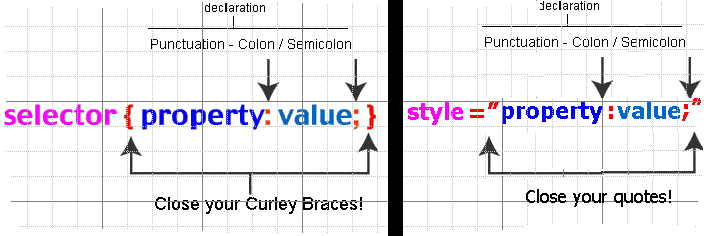
All style tags and style sheets are made up of style rules.
HTML recognizes the <style></style> tags and the style attribute as the container for these rules.
Each rule is made up of:
You may specify an HTML tag as a selector
h1 { color: green;}
That tag will then follow the style rule of the selector
<h1>
If you specify more than one selector, separate each selector with a comma
h1,h2,h3,h4,h5,h6 { color: green;}
If you specify more than one CSS rule, you must separate each rule with a semicolon ;
h1{text-align: right; font-size: 20px; }
If the rule value is multiple words (generally font-family), put quotes around the value
h1{font-family: 'Comic Sans MS', 'arial';}
----------------------
Style sheet Classes and IDs are the means of assigning your style to one or more tags. Classes start with a period (.) and IDs start with a hash (#).
The class Selector – “.” (either\or)
.xyz{text-align: right }
All Tags with the attribute: class=”xyz” will follow the style rule of that selector
p.xyz{text-align: right }
One other rule... Do Not start a class name with a number
You can also define styles for HTML elements with the id selector.
The id selector is defined as a "#" (pound/hex/hash mark)
#xyz{text-align: right }
A single Tag with the attribute: id=”xyz” will use the style rule of that selector
Do Not start an ID name with a number
The Pseudo-class
A Pseudo-class is used where an HTML Tag selector’s special events (such as hover, active...) are separated into different styles by a class (and this is most often used for hyperlinks)
A Pseudo-class
<a href="CSS_Intro.htm">CSS Introduction</a>
a:link{color:#808080;}
a:visited{color:#909090;}
a:active{color:#707070;}
a:hover{background-color:tan;color:#800000;}
A class with a Pseudo-class
<a class="xyz" href="CSS_Intro.htm">CSS Introduction</a>
a.xyz:link{color:#808080;}
a.xyz:visited{color:#909090;}
a.xyz:active{color:#707070;}
a.xyz:hover{background-color:tan;color:#800000;}
There are various ways of engaging and prioritizing these style rules from within the HTML document.
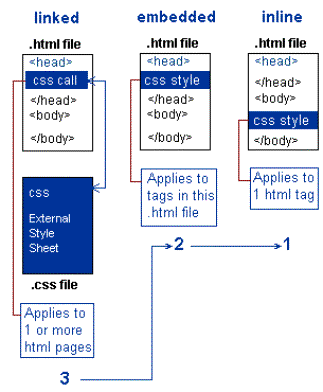
3) Linked in the head of the HTML Document
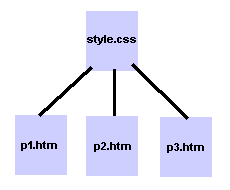 <link rel="stylesheet" type="text/css" href="css/wcws.css" />
2) Embedded in the head of the HTML Document
<style type="text/css">
.first_letter
{
font-size:133%;
color:#0000FF;
font-weight: bold;
}
</style>
1) Inline (or in the tag line of the HTML)
<p style="color: sienna; margin-left: 20px"> WebDev A05 </p>
The word Cascading just refers to the order in which the methods are interpreted by the browser.
A) As the page opens and the browser reads the HTML tags, it starts at the top with the <head> section and tags. Here it may find a call to an external stylesheet through a linked stylesheet call. It then interprets the .css file and applies those css tag properties to the content in the body.
B) If the browser then reads a set of embedded style rules located between the head tags and there are any definition rule conflicts, the embedded instructions will take precedence.
C) When the browser reads inline style rules located in the content in the body section of the page and there are any definition rule conflicts, the inline instructions will take precedence
BUT... Remember order still take precedent!
(the above description assumes that you put your style in the conventional order)
The most widely used CSS properties fall into a few basic categories:
See CSS EXAMPLES